
I really like and enjoy Airtable.
I’ve been watching a bunch of Gareth Pronovost’s videos about Airtable. Gareth is a consultant who focuses on Airtable. Lucky for me he has made a ton of really insightful videos as well.
So with my anecdotal records “base” I’ve added on a todo table. Having them in the same base lets me add a contact person for each task. I like the idea of sitting down with my principal and bringing up all of the tasks that are “for” her. (The first row below would be an example. I work on a weekly newsletter for parents, “Daniele” would be my principal, the due date is there as well, it is just a bit cut off.
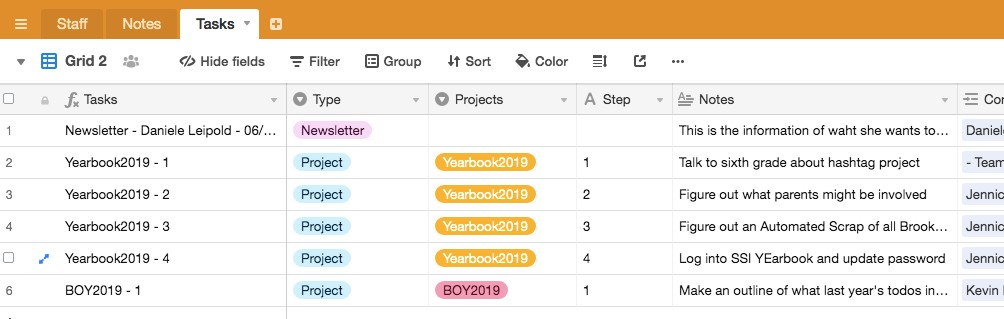
But I’ve always struggled on how to group projects together. Because I need to keep track of them, but they are hard to wrangle. So I added in a Project name field, and a Step column to list the order of the steps (if needed). And with the magic of Airtable groups I can change the view to make it easier to go through.
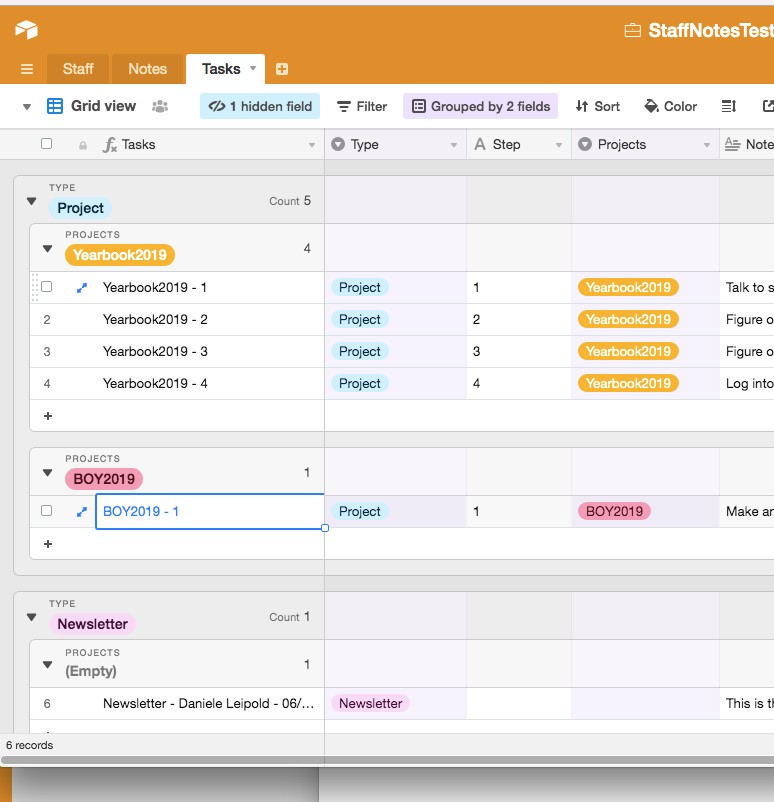
For the todo fields I have . . . .
- Task Name: This is a formula field. If it is a project the field lists as “ProjectName – Step Number” (Yearbook2019 – 2). If it is not an official project the naming convention becomes “Type – Who is it for – Due Date” (Newsletter – Daniele Leipold – 6/20/2040)
- Type: Project, Newsletter, Website Training
- Projects: Unique Name of the project
- Steps: Only for Projects, so I can give an order to the projects, what I need to work on in what order.
- Notes: Details of what this involves
- Contacts: Who am I doing the task for / who do I need to update.
- Status: InProgress, NeedToSchedule, Waiting, Scheduled, Someday/Maybe, all the GTD sort of stuff
- Context: Again GTD, where does this need to happen. At my computer? Talking to a particular person?
- DueDate: Is there a hard Due Date?
- Start Time: Gareth had this in his. I put it in mine, but I don’t know if I want to keep it or not.
- Duration: See above
- Complete: I guess Status could be used as well, but it is nice to have a button to check off afterwards.
Here is the public link to the grouped Grid View. It is view only, but I think gives a good idea.
 Notes For Kevin
You must be logged in to post a comment.