
What this post covers: The cost of ‘digging’ for information is high. By implementing five specific, AI-friendly documentation changes, you can transform your Staff Handbook into an searchable knowledge base, saving staff time and eliminating friction.
The Friction of Searching Codified Sources
In the study of information seeking behavior, information is found in one of three places
- Internalized (in your head)
- Codified (Written down somewhere)
- Social (ask someone about it)
When information is not internalized, people look to a codified or social source.
Tom is looking for the form to fill out to get his student a Mifi device. He starts digging into the written, codified, sources for the directions. Tom’s email. The staff handbook. The Schoololgy course. Tom checks everywhere he can and can’t find it.
Tom runs into friction. He starts to wonder. Maybe this is a waste of time. Are the resources up to date? Are they complete? How long will it take him to search? Is it even there!
Tom’s brain, when faced with multiple ways to figure where this form might be, will choose the path which uses the least perceived resources. Those resources might be time, effort, or cognitive load, amongst others. Researchers call this the Principal of Least Effort.
The Principal of Least Effort causes Tom to stop looking through codified resources. Tom needs to protect his limited resources (time/cognitive load) to find an answer. So he pivots. He turns to a social solution and walks over to Dave’s desk.
Tom still spends additional time by interupting Dave. And, now Dave is spending extra resources, answering a question he has already answered elsewhere.
And, let’s be real. We have all been Tom. And we have all been Dave.
Let the Robot Answer The Question
We can reduce the friction by putting our codified sources into AI. By feeding the AI our Staff Handbook (the codified source), staff can essentially “ask a question” as though it were a colleague (the social source). This shift allows them to ask AI Buddy first. However, realizing this potential required rewriting the handbook; it needed to be structured not just for human readability, but for AI readability as well.
Here are the 5 big changes I had to make to the Staff Handbook.
- AI Readability
- The Text Only Rule: Text Over Images
- The Context Rule: Use Descriptive Hyperlinks, never “Click Here”
- The Visible URL Rule: Make Hyperlinks Visible
- System Design
- The Knowledge Expansion Rule: Include Additional Resources
- The Continuous Feedback Rule: Have a Feedback Loop
The Text Only Rule: Text Over Images
Problem: Gemini Gems can’t read images.
Here is a screenshot that was in the Handbook.
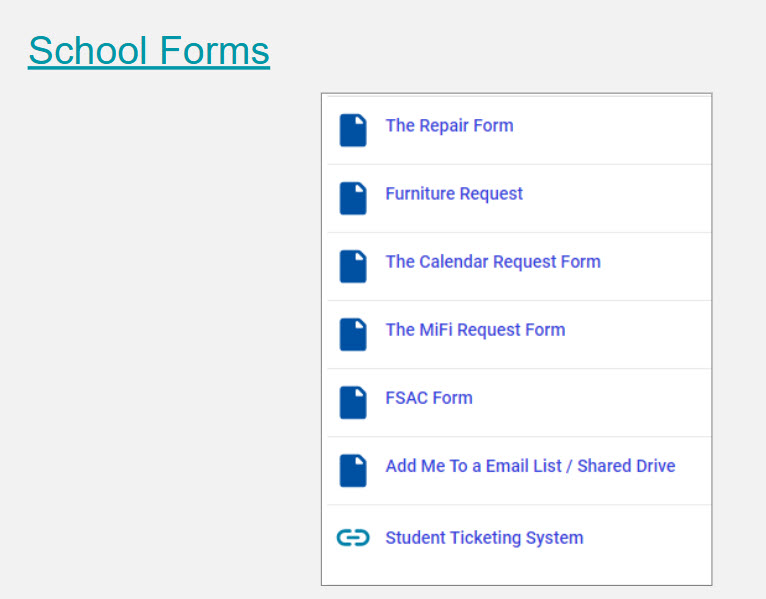
Buddy AI can’t read the screenshot. Buddy AI does not know know the MIFI Request Form is there. So when asked about the MiFi Request Form, it does not have any information.
Solution: Use Text instead
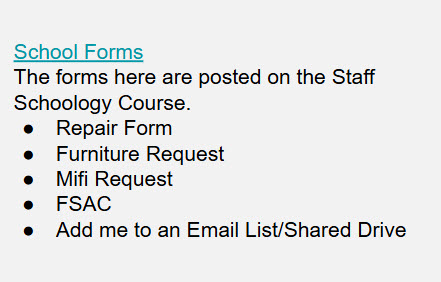
Now the section is readable by AI Buddy and people. I’ve also added more context about where to find the forms.
The Context Rule: Use Descriptive Hyperlinks, never “Click Here”
Problem: Gemini Gems does not know the context around a link.
Web-readability people will tell you not to tell someone to click here. It is not elegant, but humans can read and understand where to click. For Example:
The Calendar for the SY25-26 quarterly Progress Report Marks and Interims is posted HERE.AI Buddy has trouble knowing that the report card calendar is in that link. When you ask it where the interim calendar is, it will not be able to tell you consistently.
Solution: Add more context to your links.
The Calendar for the SY25-26 quarterly Progress Report Marks and Interims is posted in this Google doc.This is still very readable by people. AI will know where to find the document.
The Visible URL Rule: Make Hyperlinks visible
Problem: Google Gemini Can Not Read Embedded Links
This seems like it might be in conflict with “Descriptive Hyperlinks,” but stay with me.
In the link below, I’ve embedded a link to https://www.redroverk12.com/OLPS
Go To Red Rover to request a subThat is very person friendly. And it is also a very descriptive link. Both people and AI Buddy can use that text lead people to Read Rover
Google Gemini can read the plain text, but it cannot read the embedded link. So it can not see that the hyperlink is to give the user.
Solution: Create Text-to-URL Mapping.
Since Buddy can only “see” the visible text, we need a way to connect the descriptive phrase to the URL:
Go to Read Rover to request a sub = https://www.redroverk12.com/OLPSWe can include that Text-to-URL Mapping in a few places
- At the bottom of the document
- In another column, next to the text
- In another document, also included in the Google Gemini Knowledge base
Creating the Text-to-URL Mapping is the most challenging part of this process. l’ll dedicate an entire follow-up post to strategies for Text-to-URL Mapping.
The Knowledge Expansion Rule: Include Additional Resources
Problem: Your document is not expansive enough.
We have a Staff Handbook. But, there is no way to keep everything we need in the staff handbook. The document would be too big. And, once it is too big, you less people would use it.
You would need a “handbook” for each department. The Finance department would need one. The Tech Team would need one. The Instructional team would want one. And, that adds friction as no-one wants to read through mulitple documents.
Solution: Have mulitple souces of information in the knowledge base.
Every department that gets asked the same question multiple times SHOULD have a handbook. We can link all those handbooks and Google Gemini will find an answer.
I’ve also started experimenting with an “Admin Update” file. When an admin sends out an update, I add that to the Admin Update google doc. That way Google Gemini has access to those as well.
The Continuous Improvement Rule: Have a Feedback Loop
Problem: You will not know if someone does not find what they are looking for.
If a person asks Buddy AI a question, and Buddy AI does not the the answer, there is no way to find out what wa smissing.
Solution: In the Gemini Gems directions, automatically generate a link to submit issues.
In the instruction section in the AI Buddy’s Google Gem, I added this instruction.
If there is not an answer in the Knowledge please say, "I'm sorry, I do not see this in the knowledge base. If you think it should be added submit this form. http://example.com/add"The form emails me directly. I can reach out to whomever might be the appropriate resource and ask for more clarification. I can also reach out to the questioner and say the question is out of scope for AI Buddy. I’ll add more on AI Buddy’s limits below.
Know Buddy’s Limits
At the end of the day, we want to solve the problem Tom faced in his office. The time he spent searching for the MiFi form is time stolen from making his classroom a better place. By building our handbook so that both humans and AI can read it, we create a system that serves our staff and lets them focus on supporting students.
Keep in mind, AI Buddy is here for the paperwork, not the pedagogy.
 Notes For Kevin
You must be logged in to post a comment.