Weekly Review

Things to work on when I get back to work.  Hustle and being “in place.”

I tend to zone out at meetings.  Wednesday in my overly large school district I had a meeting of other instructional technology people. We were talking about a subject I was interested in.  And I just could not stay with it.  The paper helps, and I should get into the habit of putting everything else away and just using the paper.  It was helpful at VSTE.  My VSTE notes are great.  My Wednesday meeting notes are nothing.

I feel like I did not have great hustle this week.  I mean, I got some stuff done.  We did the first BreakoutEDU at my school.  But I don’t feel like I hustled.

 Monday  Tuesday  Wednesday  Thursday  Friday
 Your hustle needs more hustle Nope  Nope  Nope  Nope  Nope
 If you’re in a place, be in that place  Nope Nope  Nope  Nope  Nope
 Notice people  A bit. For Pineapple Week, we built in an ask to email thanks after a visit.  I emailed a thanks for those people I tweeted at some people, but no one in my building.  Nope  Nope  Nope
 Experiment I’ve been experimenting with making a social media content calendar. I’ve got a basic one mapped out for January. I wrote out some formatting for anecdotal notes with teachers, but that is as far as I got. I also atteneded one CLT with the aim of just seeing how I could support on the fly.  I had a couple of good moments.  I borrowed a BreakoutEDU set to play with my school Started planning out the twitter experiment No
 Ship Going with the social media content calendar, I’ve done the picture posts for all the ones I can do ahead of time. Nope  Nope  Yes  Did the first BreakoutEDU.  Got the room cleaned (sort of)
 Plan ahead Said picture posts are scheduled in Hootsuite.  The social media content calendar is planning ahead as well.  Nope  Nope  Nope  Set a couple of social media posts to go off during the week.
 Sharpen the Saw Nope  Nope  Yes, when to county in-service  Nope  Nope

Twitter Experiment: Tweet A Book

So I am going to run a Twitter experiment. I am going to tweet a book. Not a book that I have written, I am picking one of the books available on the Project Gutenberg site.

I’m still working on the process. I don’t want to post 160 characters at a time, so I’ll be

presentation1
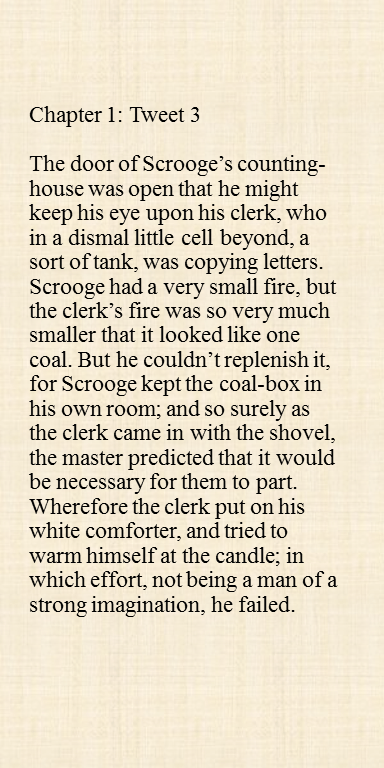
Possible Tweet

doing pictures of paragraphs. But, I know posting pictures of text can be a bit of a jerk move, because there is no way for people who rely on screen readers to read the text. Someone suggested, and I can’t remember who, posting it to Tumblr first, and then posting it to Twitter from Tumblr. That way you generate a link that people can click, and read there.


To make the actual images I am starting from the text in Word, each paragraph imports to a different slide in Powerpoint, and then exporting each slide as a JPEG.

I am thinking about doing a different background for each chapter. Our good friend Adobe Spark is a fun way to make backgrounds. I little drawing on each would be neat, but I can’t draw. But there has to be something possible.

I need to figure out a good posting solution. IFTTT can take posts from Tumblr and send them to Twitter. But, getting them into Tumblr is the issue. I have to post each image, and the text that goes along with each one. I could sit down one afternoon and batch a bunch of them all at once. But, that is time intensive. I tried doing it in Hootsuite, and I don’t think it is any easier.


Notes for Today 12.13.2016 (and a Change)

  • Your hustle needs more hustle:  Not great.
  • If you’re in a place, be in that place:  Not Great.
  • Notice people:  I tweeted at some people, but no one in my building.
  • Experiment: I wrote out some formatting for anecdotal notes with teachers, but that is as far as I got. I also atteneded one CLT with the aim of just seeing how I could support on the fly.  I had a couple of good moments.
  • Ship: Not Great
  • Plan ahead: Not Great
  • Sharpen the Saw: Not Great

Also, I am going to do a end of the week, or maybe midweek post instead of daily.

Note Taking by Hand Update December 2016

imag0679
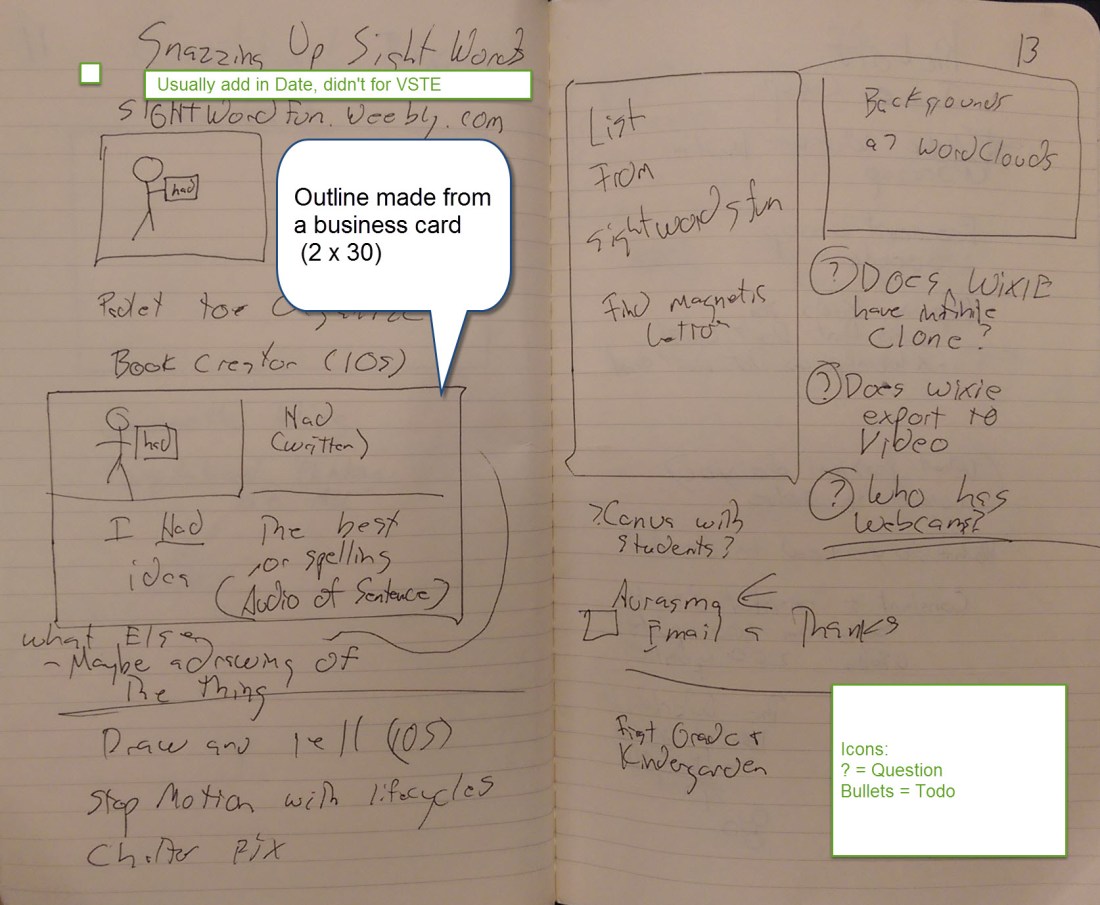
Picture from VSTE Notes December 2016

Things I like

  • I like the business card boxes.  The one of the right that has “List From sight words fun” I was going to print out a list from the website.  I never got it done.  The one on the left is a sketch of one of presentation slides.
  • I like that it is on paper.  I agree with the work by Princeton faculty Mueller and Oppenheimer.  I feel my processing is better on paper.  When I note take digitally I don’t process the information like when I have to write it down.
  • I love the pictures.
  • Using more space.  When I first started I tried to make everything as tight in as possible, to take up the least amount of space.  I don’t want to write for the purpose of taking up space, but more processing on paper should be better than less.


Things to think about

  • No color.  I’ve been using the Pilot G-2 Pens (.5 and .38 widths).  I do have Black, Blue, Red, and Green, but I tend to only pick up one color and go from there.  I also need a process for WHY to use color.  I’ll maybe experiment and go from there.  Or maybe some highlight colors with pencils.
  • I wonder if there is some way to add in a mind-map.
  • I know I don’t always go back and revisit those questions and todo lists. Should I?  Do I need to build in a time to go back and look at my notes. For the VSTE notes I’ve spent a while reviewing notes to figure out what I should talk to teams about.  For my every day notes, I don’t review as much.

Notes For Today: 2016-12-12

So, how did I do today on the Magnificent Seven?

    • Your hustle needs more hustle: Nope
    • If you’re in a place, be in that place: Not really
    • Notice people: A bit. For Pineapple Week, we built in an ask to email thanks after a visit.  I emailed a thanks for those people
    • Experiment: I’ve been experimenting with making a social media content calendar. I’ve got a basic one mapped out for January.
    • Ship:  Going with the social media content calendar, I’ve done the picture posts for all the ones I can do ahead of time.
    • Plan ahead:  Said picture posts are scheduled in Hootsuite.  The social media content calendar is planning ahead as well.

      adobe-spark-4
      Made with Adobe Spark
    • Sharpen the Saw: Nope

So, places I fell down today.  Hustle, being in the moment, and sharpening the saw.


VSTE 2016 – Day 1 – Random Thoughts

SpeakIT Chrome Extension was good, but Natural Reader works with everything, not just text in the Browser. But, if you can’t install software locally on your computer, it is a great way to go.

I’ve never been too much of a gamification person, but someone I respect a great deal saw something neat with using Credly with her staff. Worth a second look.

Ozobots look cool, but I don’t know if the price is worth it.

A co-working has a few Breakout EDU sets and is ok with me borrowing.

Jigsaw Planet will let you make your own Online Jigsaws, they were used in one of the Breakout EDU games.

I don’t know why Computational Thinking in the new ISTE standards are important.

sightwordfun.weebly.com has a focus on Ipad Apps, but I think  80% of it could be done on Wixie.

Jame Casap is pretty fascinating. (none of the following are quotes, just ideas he talked about)

  • We are preparing kids for jobs that don’t exist at workplaces that have not been build yet.
  • Don’t ask what do you want to be when you grow up, ask what problems they want to solve and what they need to learn to get there.
  • Education is set up as single player sport, but the world is set up as a team event.
  • Phoenix Coding Academy

See you on day 2!

Kevin


Opportunities for Leadership

Last year our Overly Large School District surveyed the staff about leadership, specifically opportunity for leadership in the school you work in.

And looking at the results, I feel stuck by the word leadership.  What did people think of when they were filling out that survey?  What is leadership?

Writing about what leadership is not, that is easier  Leadership is not the ability to tell people what to do. The police office that pulls me over is not leading me. Leadership is not just making a choice, though most leaders are making choices.

But, leadership is such a broad idea, you could write about it and nothing else.  So where to start?

A former principal talked about leadership being service and stewardship. Leaders work for a greater purpose, not themselves. They are stewards of the people and resources around them.  They show people a better way and help them get there.

Service and stewardship. It is a good place to start.


EdCampNova and UnConferences

I went to EdCampNova, which is a UnConference or an Open Space Meeting. Scott Berkun has a better overview (and assortment of how-to links) on UnConferences than I could ever write. This is the second type I’ve attended an UnConference, and the EdCampNova people put on a wonderful event. Keep your eyes open for the spring conference, it is worth your time.

But it’s the format itself that I want to reflect on. The UnConference should be a part of a teacher’s professional development plan, but not exclusively.

The Pros

It was a wonderful way to brainstorm with peers. My first table talked about Student Tech Teams. None of the ten educators who sat around that team had a Student Tech Team. We shared ideas and brainstormed. I think we all figured out a way forward. Everyone shared their twitter handles so we have a group to be accountable with and share what we had accomplished.

It was also was a wonderful way for a person new to a topic to learn more. My second session was on Makerspaces, a topic I know very little about. It was wonderful to listen and absorb ideas. At EdTechNova they even have virtual group notes in Google Docs, so I walked away with a wonderful set of resources.

The Keep in Minds

I didn’t want to say cons. A boat doesn’t fly, but you would not count that as a negative. That is not what a boat is for. That is why I headed this “The Keep in Minds.” Just things to keep in mind.

The topics are broad, so there seemed to be a lot of general conversations. The Makerspace and Student Tech teams discussions felt like an overview of the topics. Which, as a beginner in those topics, was fantastic. But, for the administrator whose school had a strong makerspace community, he probably did not walk away from that meeting with much.

Maybe if the group was larger (there was maybe 100 people at EdCampNova) you have enough people who could have put on the topic organization board “Advanced MakerSpaces” or “Next Steps in Maker Spaces.”  Or maybe you need to have a UnConference specifically targeting MakerSpaces (they exist) to get the group large enough for those to occur naturally.

Second, because each session is put together by the people who show up, there is no moderator or person guiding the discussion. There is a danger in strong personalities hijacking the conversation. Talking to one of the participants, she ended up leaving one of the table for a while because one side of the table kept derailing the conversation away from the topic.

My third concern took a while to put into words. Camp Stomping Ground’s video on Open Space meetings says the benefit is Open Space Meetings gives “an opportunity for each participant to learn exactly what they feel they need.” But, you often do not know what you need.

I went to our Overly Large School System’s web curator conference. I went there wanting to learn more about social media.  When I got there half the sessions were on 508 compliance.  After the first session, which was required, I realized I needed to spend the rest of the day on 508 compliance. The Unconference/Open Space Meeting format feels focus what you might already have a sense of. If you did not know about it, you would not search for more information on it.

Next Steps

So what are my next steps. I think the UnConference format would be interesting to do at my school. But to get buy in, I feel I need more people to have the experience. I think next step #1 is to get more people to go to the next EdTechNova conference. There are a few people whoI think would be candidates. I’ll have to reach out to them. If more people had experience with the format it would be easier to advocate for it at my school.

I also want to test the idea that topics have to be broad. I am hoping at the Spring EdTechNova to put some follow up topics. If I get my Tech Team Going I’d love to do Tech Team Part II at the conference to see if you can have a more detailed discussion.

Finally, I need to learn more about these conferences in general.  I volunteered to help at the next EdTechNova and I’ll start reading more about them online.


Keeping the space organized

So I am terrible at keeping the space organized.

My latest structure to deal with this is the Noguchi Filing system.  (Here and Here for more).

In a file cabinet, you need a structure.  Organized by topic?  Where would dismissal sheets go? Where does the page on the new Cisco phone go?  Or maybe alphabetical, as David Allen suggests in Getting Things Done? Is the Cisco phone document go under phone or Cisco?

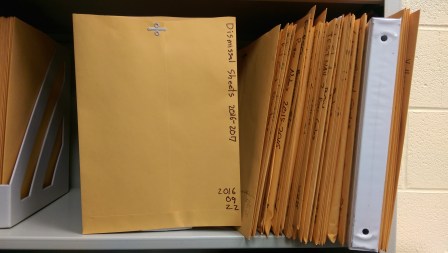
Noguchi simplifies this.  Put everything on the left hand side.  Take something out, put it back on the left hand side. It feels counter intuitive, but it works. Things that are used often are sort of on the left.  Things that get less used, go slowly to the right.

So today my desk felt overwhelming.  I spent 10 minutes, put everything in its own envelope, labeled it, and dropped it on the left.

imag0577